
Tell Claude what your AI Agent should do. Build, optimize and monitor AI Agents.
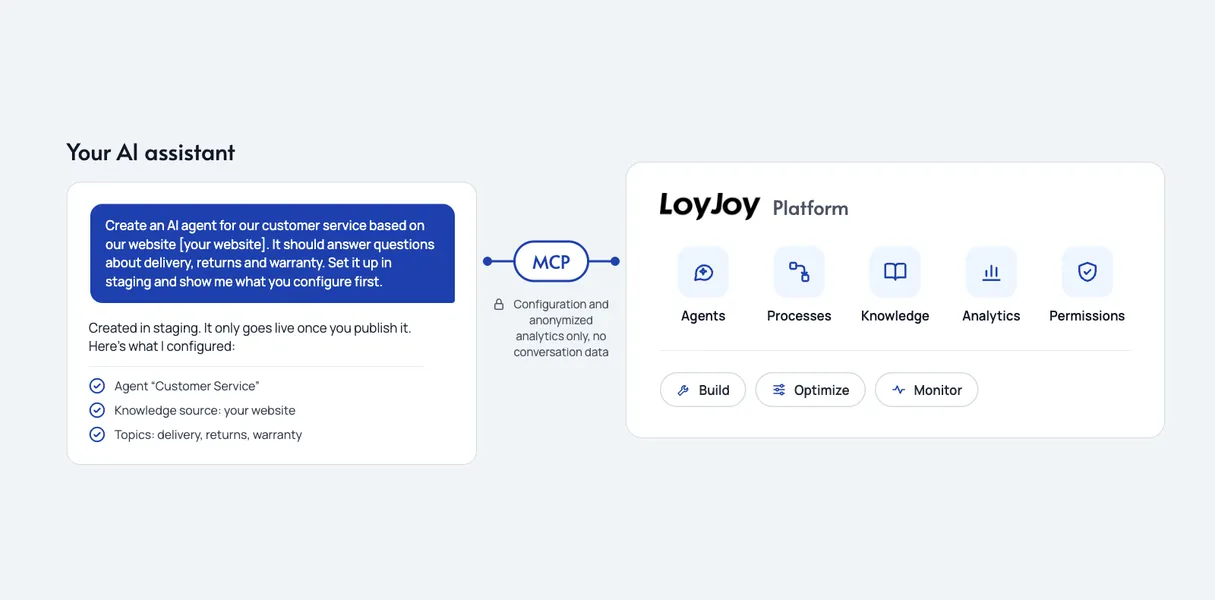
Does your team work with Claude, ChatGPT, Copilot or another AI assistant? Then you can build and manage your customer-facing AI Agents right where your team already works: in the assistant, without ever opening the LoyJoy interface.
Your AI assistant becomes your LoyJoy interface. We call this headless: you control the platform from your assistant instead of its own user interface. Something fundamental is shifting. Control of customer service technology is moving out of the interface and into the conversation with the assistant, and LoyJoy is leading the way.
From today, you can use your AI assistant to build, optimize and monitor your customer-facing AI Agents.
Until now, headless access was something you only found in developer tools for internal systems. LoyJoy brings it to the point of customer contact and puts it in the hands of business teams.
With the October release, your AI assistant can control every area of the LoyJoy Manager. AI Agents, processes, knowledge and analytics can all be managed directly from the assistant, across tenants, so also across all your brands and countries.
Build
LoyJoy is the platform companies use to run AI Agents for customer service and sales, whether as a chat agent on the website or as a phone agent. Until now, you created these AI Agents in the LoyJoy Manager by clicking and configuring. Now you simply describe in plain language what the AI Agent should do, and your assistant sets it up in LoyJoy: process, knowledge and tools are created and connected. You build right where your team already works.
Optimize
Optimizing means sharpening instructions and closing knowledge gaps. The assistant checks your instructions for contradictions and duplicates, finds gaps in your knowledge base and proposes an improved version. Your team decides what gets applied. Changes are published only after your approval, and first in staging.
Monitor
Keep every AI Agent in view. How many customer requests does it resolve without a handoff? Which topics do your customers ask about most? Ask for these metrics directly in the assistant and have it turn them into a table, an infographic or even a PowerPoint presentation. The assistant summarizes the results and flags where you should step in. Monitoring used to mean switching between dashboards. Now it’s part of the conversation.
Example prompts to try
Get started right away: set up and try headless. Copy a prompt into your assistant and let it get to work in LoyJoy. We check every prompt against the current release before we publish it.
Build
Create an AI Agent for our customer service based on our website example.com. It should answer questions about delivery, returns and warranty. Set it up in staging and show me what you’re configuring first.
Optimize
Review our AI Agent’s instructions for contradictions and duplicates. Suggest an improved version, and only apply it to staging once I’ve approved it.
Monitor
How many customer requests did our AI Agent resolve without a handoff over the last 30 days? Compare that with the previous month and show me the three most notable developments as an infographic.
Global rollout
Update the privacy notice in all AI Agents across all our brands with the following text. First, show me a list of all affected AI Agents and the planned changes.
New languages
Translate our AI Agent into French and Italian and set up both language versions in staging.
Prepare approval
What has changed in our AI Agent between staging and production? Summarize it so my team can decide on approval in two minutes.
Control stays in LoyJoy
Headless doesn’t mean uncontrolled. The assistant makes suggestions, your team reviews them, and nothing goes live without approval. Changes land in staging first, only what you approve goes live, and every version is kept and can be restored. Roles, permissions and approvals apply in the conversation too. In Claude and ChatGPT, you can allow, require approval for or block each tool individually. This separation is deliberate: speed when building and optimizing, control before publishing. You gain speed without giving up control.
One change, all brands
One change across all AI Agents of all your brands: what used to be a project is now a single sentence. Work that has to be repeated for each AI Agent in the interface and takes hours is done by the assistant in one step, across all tenants of your brands and countries if you wish. This is particularly valuable for companies with several brands, countries or AI Agents, and for partners and agencies.
Data protection
Headless means you control LoyJoy directly from AI assistants such as Claude, ChatGPT and other compatible assistants. Every data protection officer’s first question is: what can the assistant see? The answer: the assistant sees the configuration of your AI Agents and anonymized analytics, but no personal data of your end customers. It acts only with the permissions of the signed-in user. Chat transcripts and ongoing customer conversations are not available to the assistant as a tool either. You sign in with your regular LoyJoy account (for example with a passkey), with no access keys or API keys.
Made in Germany, hosted in the EU: for chat agents, our own LLM runs in a data center in Germany, and our voice AI runs in its own EU data zone. You can find more details in the Trust Center.
We live what we sell
The most honest proof is our own: at the most recent DMEXCO, we built a prototype live on stage in 30 minutes. We don’t sell anything we don’t use ourselves every day.
FAQ
What does this mean for us?
You manage LoyJoy through your AI assistant. Describe what the AI Agent should do, and the assistant builds, optimizes and monitors it in LoyJoy while your team signs off. It’s an additional way to work alongside the LoyJoy Manager.
Do we need developers for this?
No. Your business team builds through conversation, whether it’s a chat agent on your website or a phone agent. IT sets the guardrails, permissions and integrations.
Which AI assistants are supported?
Claude, ChatGPT and other compatible assistants.
Is this included in my plan?
Yes. LoyJoy Headless is included in all plans.
Does this cover analytics and monitoring too?
Yes. Ask for metrics directly in the assistant and get them as an answer, a table or an infographic, with no CSV export.
How can we see it live?
Join our free webinar on 19 November 2026 at 12:00 CET. You can register on the webinar overview.
Read more
Get started right away: set up headless. You can be up and running in three simple steps, with your regular LoyJoy account and no API keys. Or join us live on 19 November 2026 at 12:00 CET.