
Headless via MCP · three directions
Connect LoyJoy with MCP. Build agents, offer services, use data.
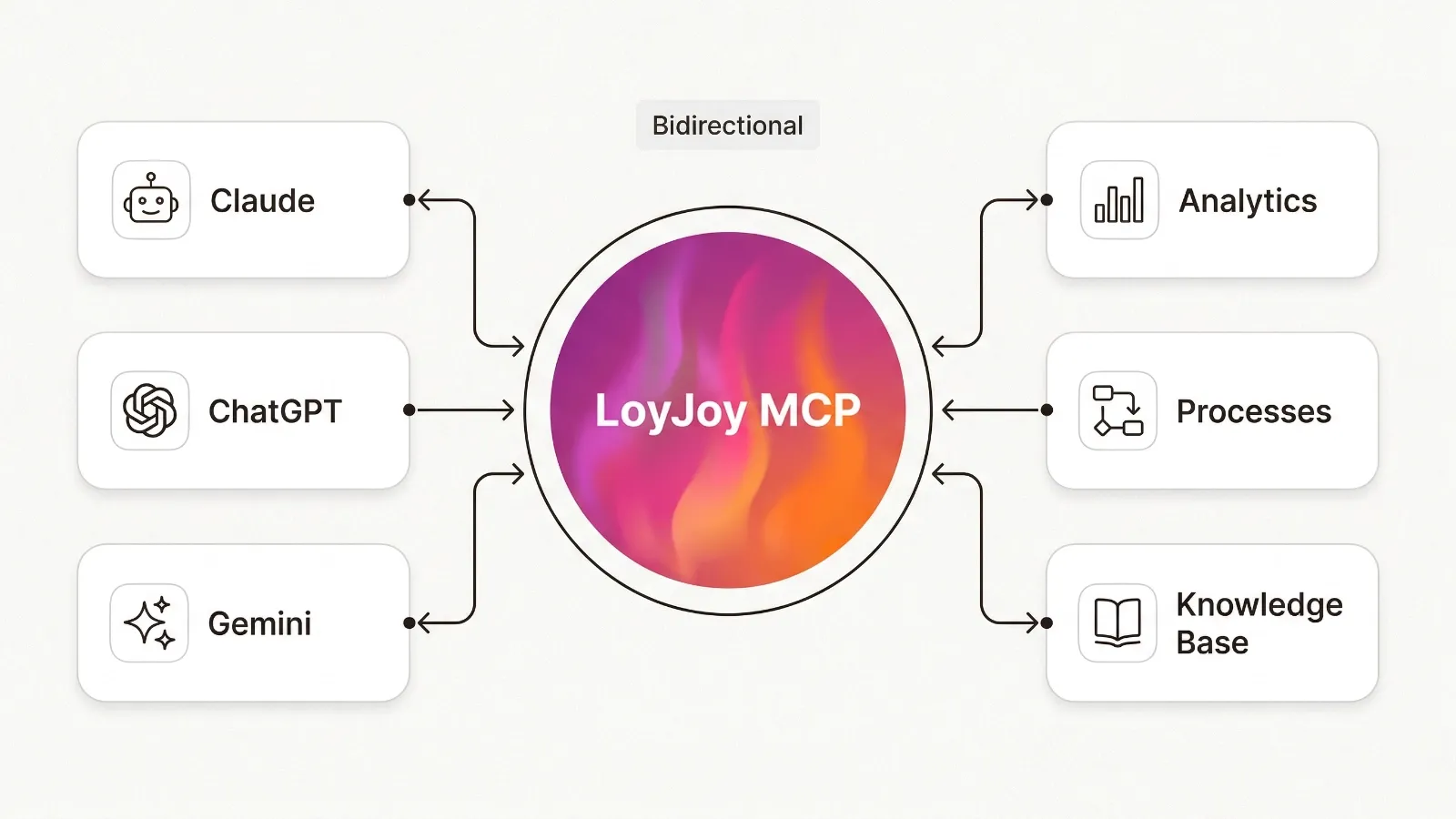
LoyJoy agents use external MCP tools. External agents access approved customer services. And your team builds, edits and analyses LoyJoy agents from Claude, ChatGPT, Microsoft Copilot or other MCP-capable AI assistants. LoyJoy Headless is included in all plans.
What is MCP?
MCP, the Model Context Protocol, is an open standard that connects AI assistants and systems. Assistants can discover and call approved functions without a custom integration for every connection.
LoyJoy uses MCP in three directions: as a client for external tools, as an agent server for customer services and as a tenant server for operator teams. With headless access, your AI assistant becomes the interface while LoyJoy remains the governed layer for agents, processes, knowledge, analytics and permissions.
Client, outbound, inbound
One protocol, three use cases
MCP connects the LoyJoy platform with the world of AI agents. One protocol, three use cases that reinforce each other.
- ●MCP servers as tools.
- Connect any MCP-enabled system such as ERP, shop, CRM or internal APIs to your LoyJoy agent. The agent uses its tools autonomously, with no custom integration and no code.
- ●Outbound: your services in the agentic web.
- Your customers' personal AI agents access your services, products and processes via your LoyJoy AI agent, securely, in a controlled manner and end-to-end. With WebMCP, your website itself becomes agent-enabled: external AI assistants find your agent through your website.
- ●Headless: your team works in its AI assistant.
- Connect your LoyJoy tenant to Claude, ChatGPT, Microsoft Copilot or other MCP-capable AI assistants. Create and edit agents, query analytics and develop your own analyses in conversation.
Every tool call is traceable
Whether a custom MCP tool or a knowledge search: every call and result can be inspected in detail in the conversation detail view.
See the example on the Agentic AI page →WebMCP: your website in the agentic web
Every LoyJoy agent is already an MCP server. The open question has always been: how does the customer’s AI assistant find this agent? WebMCP is the answer.
WebMCP makes your website agent-enabled: its services and content become discoverable and callable by external AI agents such as ChatGPT — curated and approved by your company instead of unverified third-party sites. Customers’ AI assistants find your LoyJoy agent directly through your website.
Live: analytics in Claude via MCP
See your team connect its LoyJoy tenant, query analytics in natural language and create an infographic.

Analytics in Claude via MCP, in 2 minutes
Click to play. The video is only loaded from YouTube after you click (privacy-friendly).
What your team does in its AI assistant
Once your tenant is connected, you work with your platform data in natural language.
Analytics
”How many requests has the customer service agent automated in the past 30 days? Give me a breakdown by process type.”
Management update
”Draft an executive summary for the board: automation rate, top 3 request categories, trend vs. previous quarter.”
Knowledge search
”Search the knowledge base for all articles on cancellation and summarize the key points.”
Process analysis
”Which process steps have the highest drop-off rates? What might be the reasons and what optimizations do you recommend?”
Content creation
”Based on our latest release notes, write a LinkedIn post highlighting the most important new features for enterprise customers.”
Comparison
”Compare the automation rates of our three AI agents and present the results as an infographic table.”
LoyJoy Headless
Build and improve AI Agents in conversation
Describe what your agent should do in Claude, ChatGPT, Microsoft Copilot or other MCP-capable AI assistants. Your assistant uses approved LoyJoy tools to create or edit it. Review the changes and publish under control in LoyJoy.
See how LoyJoy Headless works →Tool overview
What your LoyJoy MCP server offers
After connecting Claude, ChatGPT, Microsoft Copilot or other MCP-capable AI assistants, your team can use the tools approved for their roles.
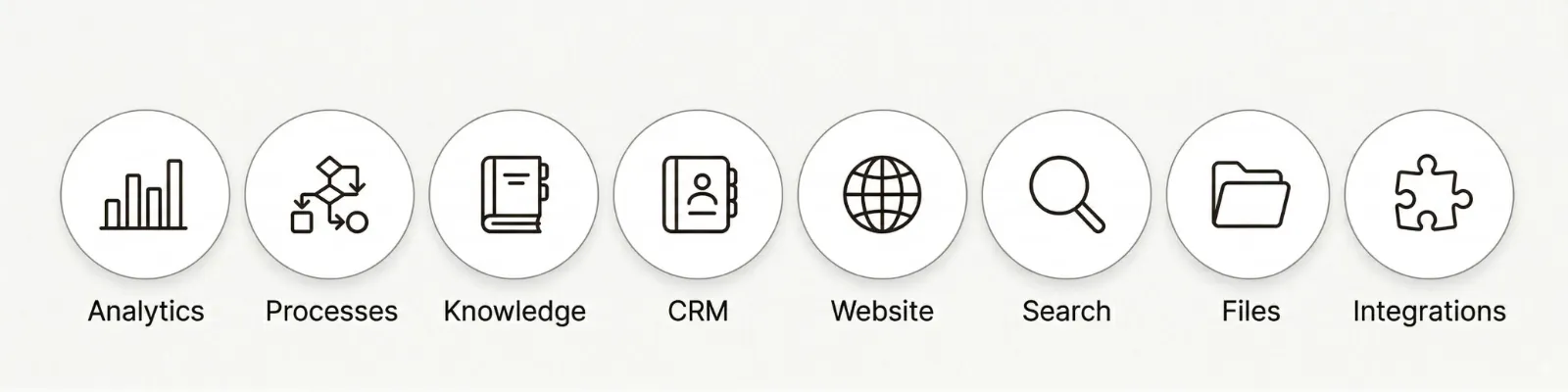
- Retrieve analytics.
- KPIs per process and sub-process, for any time period.
- Processes & views.
- Browse AI agents, BPMN definitions, home pages and navigation structures.
- Knowledge base.
- Semantic search across your knowledge base.
- Website content.
- Read and create blog posts, cases and releases.
- Emails & files.
- Gmail, Google Drive and connected data sources.
- Web search.
- Brave, DuckDuckGo and Tavily for in-context research.
Key benefits of the LoyJoy MCP server
Future-proof, scalable, GDPR-compliant. MCP brings your business into the agentic web.
- Future-proofing and competitive advantage.
- Position yourself as a pioneer and secure a critical edge in tomorrow's customer communication.
- Seamless integration.
- Enable external AI agents to exchange information smoothly and execute processes directly via your LoyJoy AI agent.
- Efficiency and scalability.
- Automate handling of requests from various AI agents and significantly reduce the workload on your service teams.
- Expanded digital reach.
- Be present and responsive exactly where your future customers operate, via their personal AI assistants.
- Controlled data access.
- Precisely define which information, services and processes external AI agents may access.
- Process automation.
- Execute complex, customer-oriented processes end-to-end in the agentic web, not just answer questions.
Setup in 3 minutes
Connect your tenant to your AI assistant
Add the LoyJoy MCP server to Claude, ChatGPT, Microsoft Copilot or other MCP-capable AI assistants, install the free LoyJoy skills and work on your agents in conversation. Sign in with your LoyJoy account, no API key needed.
Platform comparison
LoyJoy MCP in comparison
MCP is the new standard for AI connectivity. Not every platform is ready for it.
| Capability | LoyJoy | Typical chatbot builder | Contact-center platform |
|---|---|---|---|
| External MCP servers as agent tools (client) | ✓ included | no | no |
| MCP server (outbound) | ✓ included | no | no |
| Analytics in Claude, ChatGPT, Microsoft Copilot and other MCP-capable AI assistants (headless) | ✓ included | no | no |
| Granular access control | ✓ | no | partial |
| EU hosting and GDPR-compliant | ✓ | varies | varies |
| No-code setup | ✓ | limited | no |
| Chat and voice (phone) | ✓ | no | ✓ |
One AI stack, two responsibilities
Copilot or ChatGPT Enterprise does not replace a platform for customer processes
Choosing a company-wide AI assistant and operating AI agents at the customer interface are two different decisions. MCP connects both areas without conflating them technically or organisationally.
Assistants for employees
Copilot, ChatGPT Enterprise, Claude or Gemini support employees with research, writing and internal tasks. Identity, licensing, approved work environments and the controlled handling of shadow AI are central to this decision.
AI agents for customers
Customer-facing agents need controlled processes, integrations, roles, retention periods, auditability and operation across chat and phone. LoyJoy provides the platform that connects knowledge, systems and executable processes.
The decisions remain independent. Your organisation can standardise its preferred employee assistant and continue using LoyJoy for AI agents at the customer interface. MCP allows both to work together in a controlled way.
Frequently asked questions about MCP at LoyJoy
An MCP server exposes data and functions through the Model Context Protocol. LoyJoy offers two different server interfaces: the agent for approved customer services and the tenant for your team to work with agents, knowledge and analytics.
Yes. Every LoyJoy AI agent can connect to any MCP server and use its tools autonomously, for example your ERP, shop system or internal APIs. Access is governed by the same granular permission model.
Claude, ChatGPT and OpenWork. Teams can create and edit agents as well as read data and analyse analytics. LoyJoy Headless is included in all plans.
Yes. Access is granularly governed by the LoyJoy roles and permissions model and all tokens can be revoked at any time. The platform is EU-hosted and GDPR-compliant.
Headless access to the LoyJoy tenant is included in all plans. AI assistants may require their own licences and have separate terms.
Yes. With Claude, ChatGPT, Microsoft Copilot and other MCP-capable AI assistants you can create and edit LoyJoy agents through approved tools. Roles, permissions and controlled publishing remain in the LoyJoy Platform.
WebMCP makes your website agent-enabled: its services and content become discoverable and callable by external AI agents such as ChatGPT. While every LoyJoy agent is already an MCP server, WebMCP answers the question of how the customer's AI assistant finds this agent — directly through your website, curated and approved by your company.
Experience MCP in practice
See how your team builds and edits AI Agents and works with analytics directly from Claude, ChatGPT, Microsoft Copilot or other MCP-capable AI assistants.