

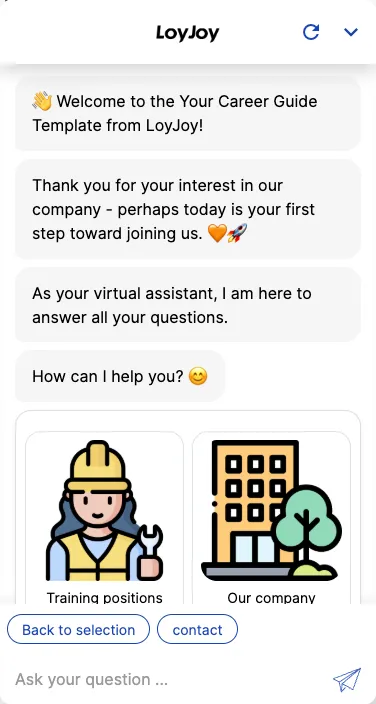
Career guide: chatbot template for HR and recruiting
Description
Career chatbot: guides candidates through open roles, locations and company culture interactively via chat or email today.
Highlights
Highlights
- Get to know the company: Information about locations, values, and culture
- Direct & personal: Ask questions interactively – via chat or email
- Flexible usage: Perfect for social media, career pages, or trade fair presentations
This template guides candidates interactively through your job offering. Instead of a static careers page, the agent asks about interests, qualifications and availability in chat, suggests matching roles and collects contact details for the next step.
Highlights
- Get to know the company: Information about locations, values and company culture right in the chat.
- Direct and personal: Candidates ask questions interactively, via chat or email.
- Suggest matching roles: Interests and qualifications are collected, and the agent suggests matching open roles.
- Flexible usage: Ideal for social media, career pages or trade fair presentations.
Use cases (examples)
- First point of contact for candidates on the careers page
- Qualifying candidates before the first contact with HR
- Trade fair presentations with direct answers to common candidate questions
- Social media campaigns with a direct link into the recruiting conversation
- Pre-selecting matching roles based on interests and availability
What is included in the template?
- Interactive chat flow with questions on interests, qualifications and availability
- Job catalogue with matching logic for relevant suggestions
- Collection of contact details for handover to your team
- Connection to your applicant management system via API client
Get started in under 5 minutes
- Install the template
- Fill the job catalogue: Add open roles and the matching qualification questions.
- Adjust the matching logic: Define how interests and qualifications lead to matching roles.
- Set up the handover: Configure the connection to your applicant management system via API client.
Frequently asked questions
Not necessarily. It complements the careers page with an interactive entry point that guides candidates to matching roles.
Through a matching logic that compares interests, qualifications and availability against your job catalogue.
Yes, besides the chat, candidates can also reach out by email.
Through the connection to your applicant management system via API client.
On the careers page, in social media campaigns or at trade fairs, wherever you get in touch with candidates.
Yes, the job catalogue, qualification questions and matching logic are adjustable in the no-code editor.