
GPT briefing chat: chatbot template for structured AI texts
Description
GPT briefing AI agent: gathers all details in chat and uses AI to draft a matching text in minutes, ready to send to customers.
Highlights
Highlights
- Structured input of all relevant briefing details via chat
- Ready-to-use GPT prompt included – get started right away
- Customizable for various use cases
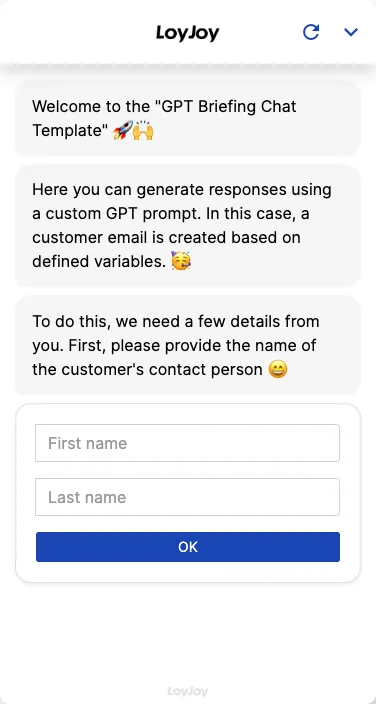
This template guides users through a structured briefing conversation in chat. The agent asks all the information needed, for example recipient, occasion, tone of voice and content points, and has the input confirmed. Based on a stored GPT prompt, the AI turns this into a matching text draft within minutes, which can be refined further.
Highlights
- Structured input via chat: All relevant briefing details are gathered step by step instead of in one long form.
- Ready-to-use GPT prompt: A built-in prompt turns the answers into a text draft right away.
- Flexible for many text types: Customer emails, internal texts, marketing briefings or sales replies, the use case is adjustable in the no-code editor.
- Confirmation before text creation: Users see and confirm their answers before the AI creates the text.
Use cases (examples)
- Draft customer emails quickly and consistently
- Create internal texts such as announcements or memos
- Turn marketing briefings into a first text draft
- Prepare sales replies for recurring requests
- Internal team tool to get a text draft without the writing effort
What is included in the template?
- Chat flow with structured briefing questions (recipient, occasion, tone of voice, content points)
- Confirmation step before text creation
- Built-in GPT prompt for text creation
- Adjustable briefing fields and prompt in the no-code editor
Get started in under 5 minutes
- Install the template
- Adjust the briefing questions: Tailor the fields to your use case, for example customer emails or marketing texts.
- Review the GPT prompt: Adapt the instructions to your company’s tone and style.
- Share access: Distribute the link or QR code within your team and generate the first text drafts.
Frequently asked questions
For any text based on a structured briefing, for example customer emails, internal texts, marketing briefings or sales replies.
The agent asks all necessary information step by step, for example recipient, occasion, tone of voice and content points, and has it confirmed at the end.
From a stored GPT prompt that turns the confirmed briefing answers into a text draft.
Yes, fields, order and number of questions are configurable in the no-code editor.
Yes, the prompt is fully editable and can be adjusted to your company tone of voice and requirements.
The result is a draft. We recommend reviewing it before sending and adjusting it if needed.