
Language selection: chatbot template for multilingual audiences
Description
Language selection chatbot for global brands: users pick their language directly in chat, LoyJoy supports 40 languages out of the box.
Highlights
Highlights
- Easy language selection at the start of the chat
- Seamless user guidance – no manual switching required
- Perfect for international brands and multilingual audiences
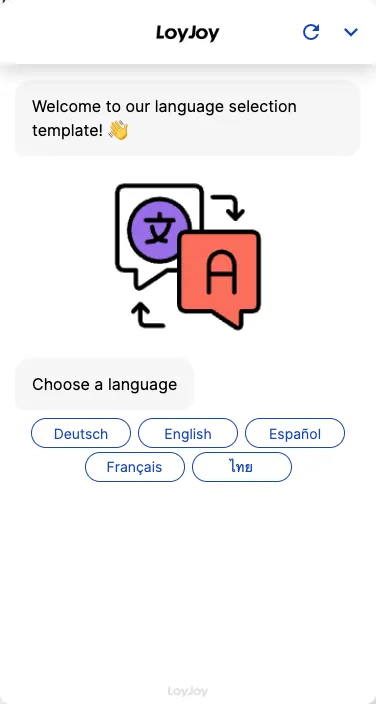
This template shows a language selection step at the start of the chat. Users pick their preferred language, and the rest of the flow continues consistently in that language. The LoyJoy Platform supports 40 languages out of the box, and automatic language detection can be enabled optionally.
Highlights
- Language selection at the start: Users pick their language with one click before the conversation begins.
- 40 languages out of the box: The LoyJoy Platform supports 40 languages with no additional configuration.
- Seamless user guidance: The entire flow continues consistently in the chosen language, with no manual switching.
- Automatic language detection optional: Instead of an active choice, the language can also be detected automatically.
Use cases (examples)
- International brands with a multilingual audience
- Support agents for customers across several countries
- Trade fairs and events with an international audience
- Multilingual career or product pages
- Tourism and leisure offerings with foreign guests
What is included in the template?
- Language selection step as the first module in the chat flow
- Pre-configured support for 40 languages
- Optional automatic language detection
- Sample flow showing the continuation in the chosen language
Get started in under 5 minutes
- Install the template
- Select your languages: Decide which of the 40 available languages you want to offer.
- Decide on automatic detection: Enable it optionally if users should not have to pick a language actively.
- Embed and publish: Deploy the chat on your website, in your app or via QR code.
Frequently asked questions
40 languages out of the box, with no additional configuration.
Not necessarily. Automatic language detection can be enabled as an alternative.
The entire subsequent flow continues consistently in the chosen language.
Yes, in the no-code editor you decide which of the 40 languages are actually offered.
International brands and any agent with a multilingual audience, for example in tourism, at trade fairs or in international support.
Like any LoyJoy agent: via your website, in your app or via QR code.