

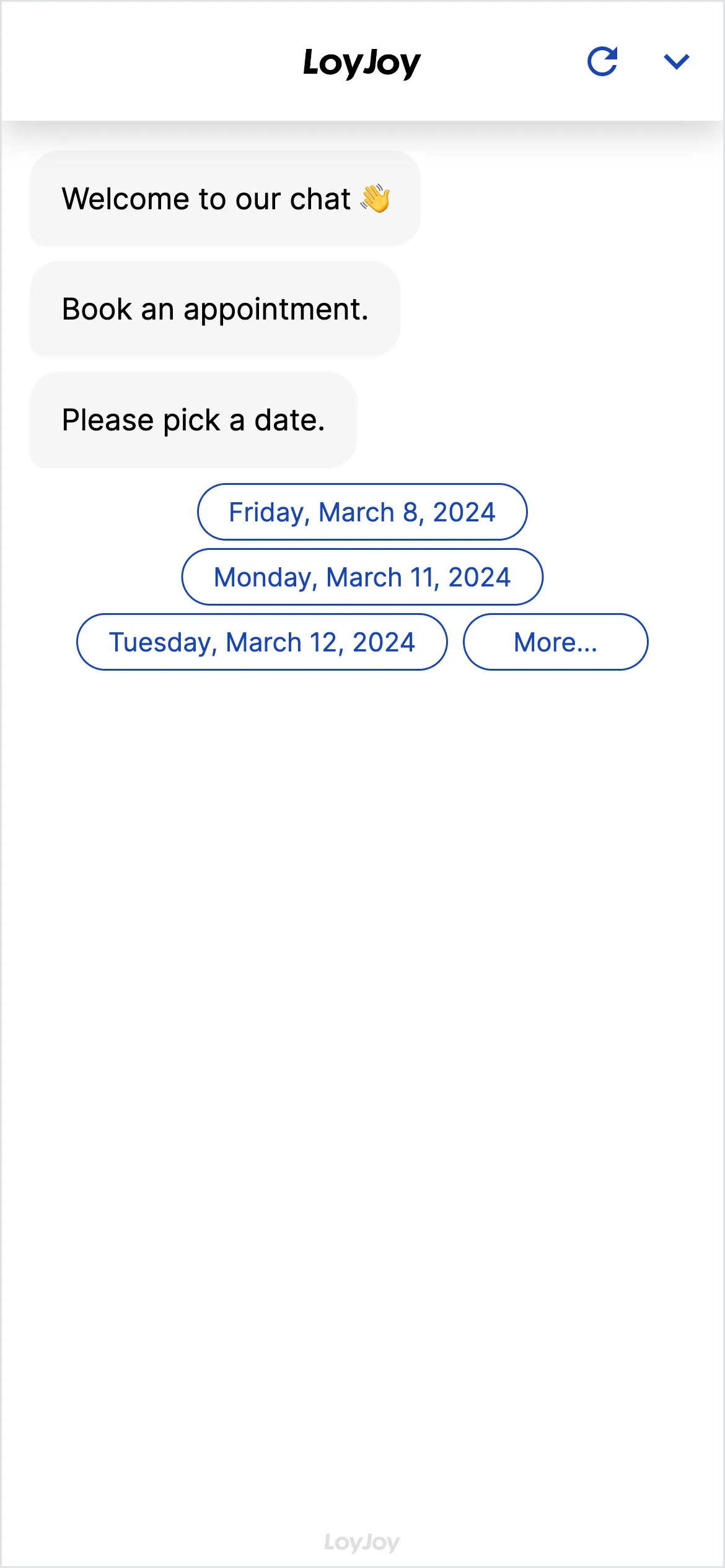
Book appointment: chatbot template for seamless appointment booking in chat
Description
Enable a seamless appointment booking experience by allowing users to schedule an appointment directly within the chat interface.
Highlights
Highlights
- Easy appointment scheduling
- Plug and Play booking experience
- Seamless integration with your calendar
Letting customers book an appointment without a phone call and without email back-and-forth: this template guides users through an appointment booking directly in chat. The chatbot asks for the desired topic, date, time and contact details, shows available slots and confirms the booking right away. Suitable for consulting, service teams and anyone who currently coordinates appointments manually.
The booking is sent by email to the user and added to your team’s calendar. The template connects to external calendar or booking systems, for example Calendly, Google Calendar or Outlook, via the API client or a webhook.
Highlights
- Easy appointment scheduling: Topic, date and time are captured in the dialog, available slots are shown directly in chat.
- Plug and play booking experience: The booking is confirmed in chat and automatically sent by email to the user and to your team’s calendar.
- Seamless integration with your calendar: Connect Calendly, Google Calendar or Outlook via the API client or a webhook.
Use cases (examples)
- Booking consulting appointments in-store, by video call or phone
- Coordinating service and maintenance appointments without a callback
- Booking trial appointments or first conversations straight from the website
- Taking load off sales or support teams for appointment scheduling
- Catching recurring appointment requests automatically
What is included in the template?
- Guided dialog for topic, preferred appointment and contact details
- Display of available slots directly in chat
- Confirmation email to users and calendar entry for your team
- Connection to external calendar or booking systems via API client or webhook
- Mandatory fields, slot logic and confirmation texts adjustable in the no-code editor
Get started in under 5 minutes
- Install the template
- Connect your calendar: Link your booking or calendar system, for example Calendly, Google Calendar or Outlook, via the API client.
- Define slots and mandatory fields: Configure available times, topics and required data in the no-code editor.
- Embed the chat and test it: Add it to your website, share it via QR code or newsletter link, and run a test booking.
Frequently asked questions
Within minutes. You connect your calendar or booking system via the API client and define slots and mandatory fields in the no-code editor.
From your connected calendar or booking system, for example Calendly, Google Calendar or Outlook. The connection runs via the API client or a webhook.
The booking is confirmed in chat right away. In parallel, the user receives a confirmation by email and the appointment is added to your team calendar.
Yes. External calendar or booking systems are connected via the API client or a webhook, regardless of which system you use.
Yes. Mandatory fields, slot logic and confirmation texts are adjusted in the no-code editor to fit your scheduling process.
Yes. The template runs on the EU-hosted LoyJoy Platform. Built-in privacy and governance controls enable GDPR-compliant deployment and can be configured for your process.